Why We Built Pholume: A Connected Workspace for Photography Studios
Running a photography studio or wedding cinema team today often means piecing together five or six separate tools: one service for delivering client galleries, a spreadsheet for tracking camera bodies and lenses, WhatsApp group chats for crew call sheets, and hours of manual filename matching inside Adobe Lightroom Classic.
We built Pholume with a straightforward goal: to give professional photographers and creative studios in India a refined client delivery gallery alongside practical tools for studio project management, equipment tracking, and post-production proofing.
1. Predictable Storage vs Per-Event Delivery Fees
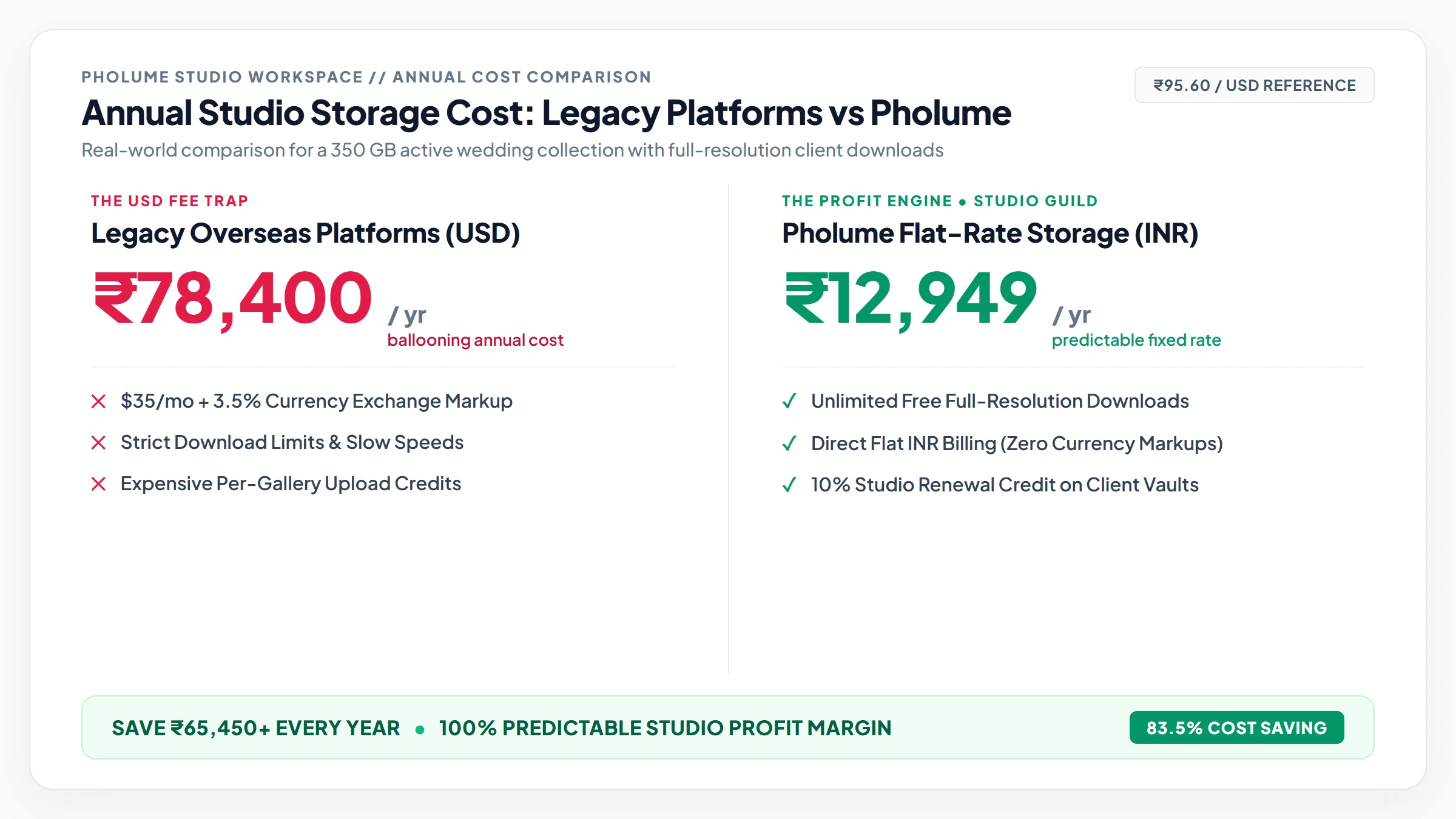
Many gallery platforms charge per-event upload credits or bill in US dollars, which increases annual costs when families download multi-gigabyte wedding archives repeatedly. Pholume provides flat, predictable INR storage plans with unlimited full-resolution photo downloads and zero download charges.
When a three-day Indian wedding gallery is shared with the couple, both sets of parents, and extended relatives, the full-resolution archive is downloaded dozens of times across phones and laptops.
On platforms that charge per-event credits or add bandwidth restrictions, popular wedding galleries quickly become expensive to host. Pholume uses fast, secure cloud storage priced in Indian Rupees (starting with a free 5 GB pass or paid studio plans from ₹149/month) so clients can download full-resolution ZIP archives without extra download charges.
2. Eliminating Manual WhatsApp Filename Matching in Lightroom
After delivering a wedding preview gallery, photographers routinely lose hours copying and pasting 150+ DSC filenames from WhatsApp messages into Adobe Lightroom Classic. Pholume's native two-way Lightroom plugin syncs client favourites and retouch notes directly into your local desktop catalogue as five-star ratings.
Every wedding editor knows the friction of manual album selection:
- The couple sends a message on WhatsApp listing 150 filenames (DSC_4021.JPG, DSC_4088.JPG...) or cropped phone screenshots.
- The editor works across split screens, searching for each number one by one inside a 4,000-photo Lightroom catalogue.
- Three to four hours of editing time are spent on manual file lookup before album design even begins.
With the Pholume 2-Way Adobe Lightroom Classic Plugin, couples tap the heart icon on their favourite photographs inside the gallery and attach edit notes directly to specific frames. One click in Lightroom highlights every selected RAW file with a 5-star rating.
3. Keeping Track of Camera Gear on Multi-Day Shoots
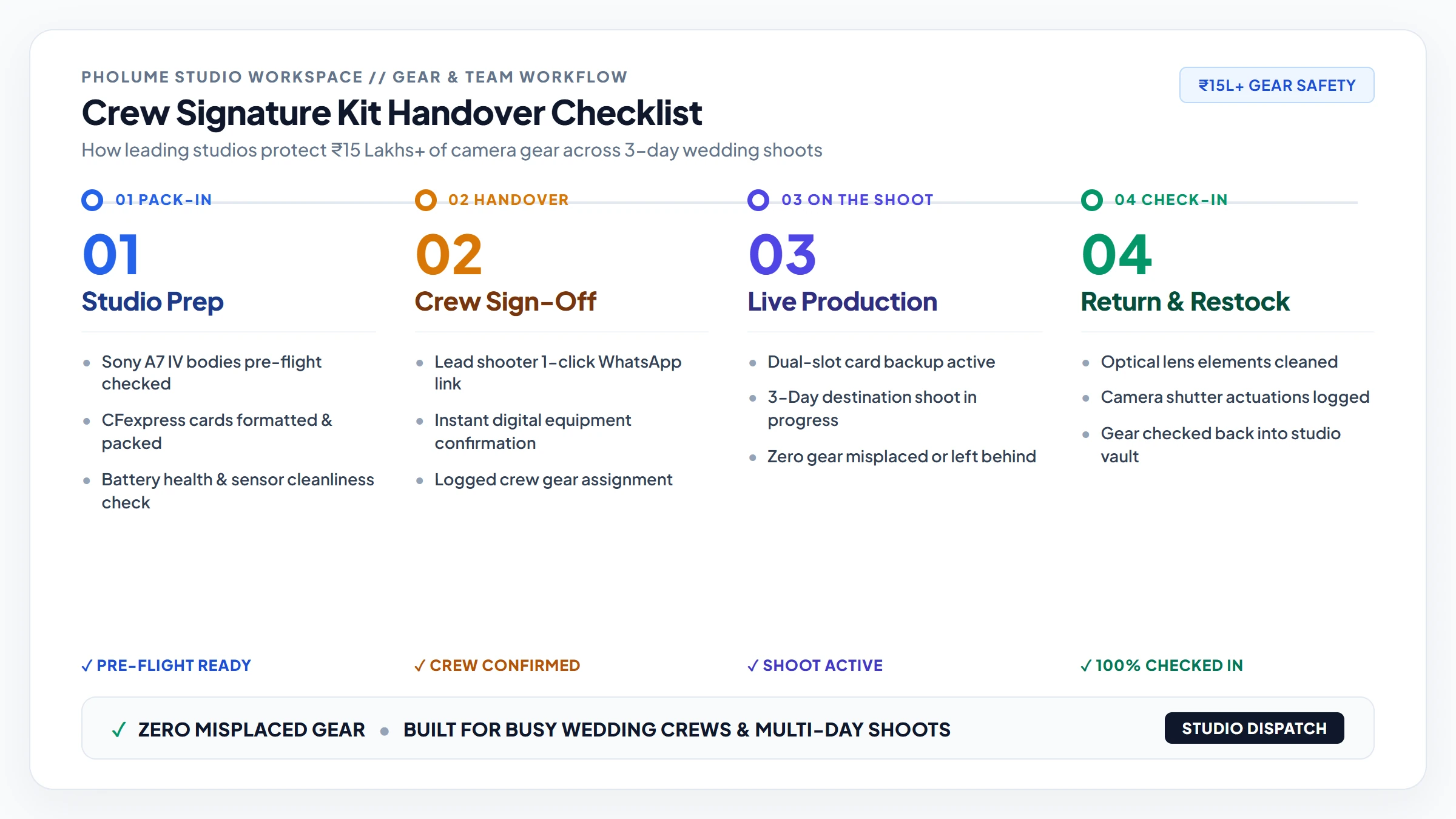
Multi-day destination weddings involve dozens of camera bodies, prime lenses, batteries, and audio recorders changing hands between lead shooters and assistants. Pholume includes a built-in Studio Gear Locker to log serial numbers, monitor camera shutter counts, and share mobile crew call sheets.
During busy wedding weekends in Udaipur, Goa, or Jaipur, equipment is packed and unpacked late at night across multiple venues. Relying on memory or static spreadsheets makes it easy for lens caps, batteries, or rented prime lenses to go missing.
Pholume's Studio Gear Locker keeps hardware records organised in one place:
- Assign specific camera and lens kits to crew members for each event.
- Share digital pack-in and pack-out checklists through a mobile crew link.
- Track camera shutter counts and service intervals across the season.
- Dispatch team call sheets directly to WhatsApp with venue locations and reporting times.
!Studio crew kit assignment and equipment handover checklist workflow
4. Long-Term Archiving with the Client Memory Vault
When a studio's standard 6- or 12-month hosting window ends, deleting galleries can disappoint families while keeping them online forever consumes studio storage. The optional Client Memory Vault lets couples preserve their archive directly while freeing up your studio's storage quota.
With the Client Memory Vault, couples can choose to keep their wedding gallery online long-term for ₹499/year or ₹1,499 for 5 years:
- Frees your studio storage: Once a couple activates a Memory Vault, their files no longer count against your studio's reusable storage plan.
- 10% studio renewal credit: Ten per cent of every Memory Vault renewal is added as credit towards your studio's own annual plan.
5. Privacy-First Galleries & Editorial Typography
Client wedding archives contain personal family moments that deserve strict privacy. Pholume never performs biometric facial scanning or AI training on client photographs, and presents every gallery in clean, custom typography themes.
Every gallery can be styled with one of 13 custom typography themes (including classic serif and minimalist layouts) protected by a 4-digit client PIN, ensuring your studio's work is presented with quiet confidence.
Get Started with a Free Studio Pass
Whether you lead a wedding photography team, work as a portrait photographer, direct wedding films, or run a commercial studio, you can test the full workflow at your own pace.
- Start with the Free 5 GB Studio Pass • No credit card required.